
ACS Technologies' Check-in software streamlines the process of managing attendees for events, classes, and worship services. It provides a comprehensive suite of tools designed to enhance the check-in experience, ensure safety, and offer valuable insights into attendance patterns.

Vendor
ACS Technologies

Overview
The Check-in software is a key component of the MinistryPlatform suite, offering a user-friendly and efficient way to manage attendance. It caters to the unique needs of organizations requiring robust attendance tracking and management capabilities. From personalized kiosk experiences to classroom management tools, Check-in provides a multifaceted solution for managing attendees.
Features
Kiosk
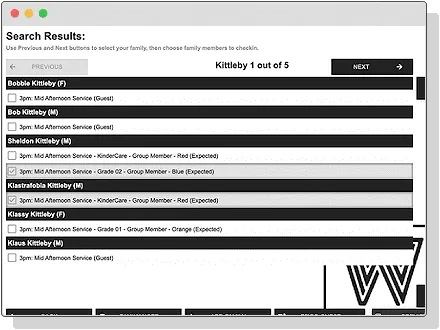
Personalize the kiosk experience with themes for events and customized labels. Improve the check-in experience for attendees with multiple search options, the ability to check-in guests, and the option to add a family note.
Capacity Management
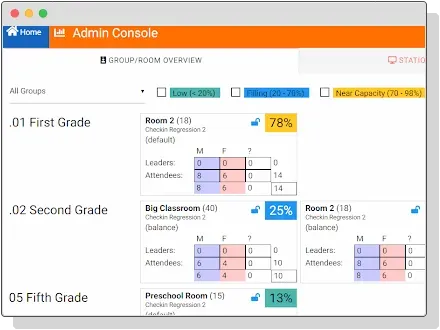
View capacity of each room and manage capacity by automatically closing rooms based on number of attendees. You can also enable Balance Priority to fill multiple rooms evenly or one by one according to your preferences.
Classroom Manager
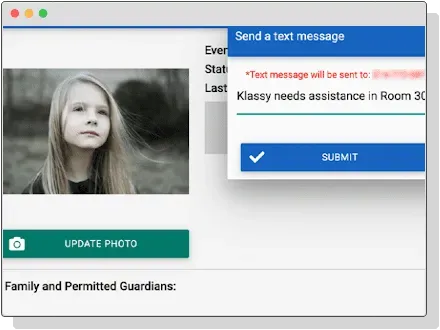
Provide your teachers with a head’s up display of kids who are present. Using the Classroom Manager, teachers can view children who are checked-in, mark attendance during their event, manage children records, and send notifications to parents as needed. As safety is a priority, they can also identify persons who are not approved to pick up a child and check out a child to the appropriate parent or guardian.
Reporting
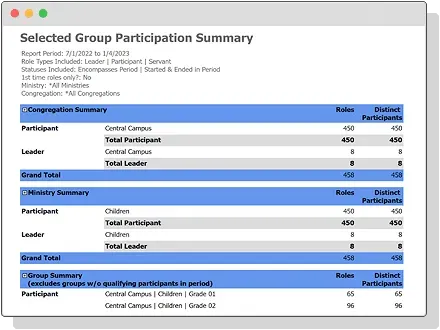
Run reports on attendance for events, classes, or worship, such as the Selected Event Summary or Group Attendance reports. View attendance details for specific participation statuses, such as attended and confirmed, and for group role types, such as leader, participant, or servant.